Your work is yours, and the free plan
Everything Card-a-mon does is free: the editor, the PDF and the images for print, spreadsheets, sharing, Play online and connecting your own AI assistant. This page says why a game made here is never stuck here, and how to make the most of the free plan.
No lock-in
A game you make here can always leave, whole, and be printed without Card-a-mon.
- The whole project as a zip. Whole project, under Export & import, downloads everything: the cards and their layouts, every picture and font, and even the faces of Card-a-mon's own typefaces and the pictures of the emoji the cards use. See the whole project as a file.
- A documented format. The cards are in
project.json, plain JSON, and The project file says what every part of it means, so that a script or another tool can read it. - A page that prints without Card-a-mon. Every zip has
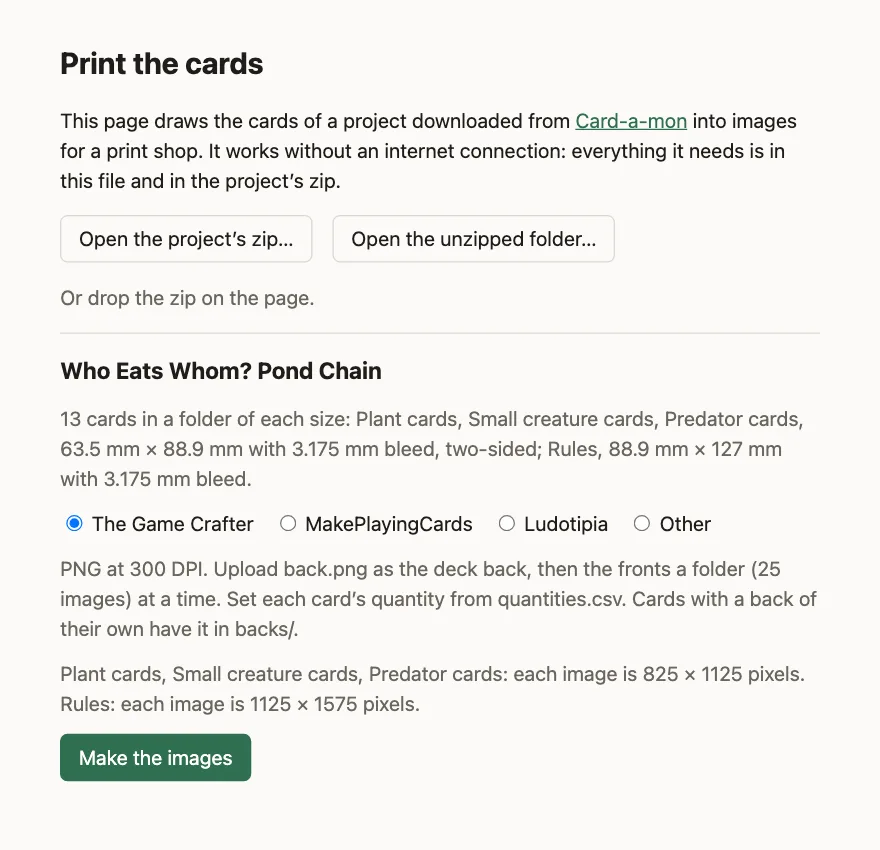
print.htmlin it, which draws the cards into images for a print shop in any browser, with no connection: the code that draws them is inside the page, and the pictures and fonts are in the zip. It is under the MIT licence, so you may keep it, change it and pass it on. - The cards as a spreadsheet, the print-and-play PDF and the images for a print shop are all free, on every plan.
- Games kept on your own computer. A project can be kept in your browser rather than on the server, with no account at all: see Keep games on this computer.
What the free plan has
Every feature, with these limits:
- 100 MB of pictures and fonts, for all your projects together;
- one deck at a time hosted for Tabletop Simulator by Play online;
- earlier versions of the cards kept for 7 days;
- no AI credits each month, though packs of them, from €5, work on the free plan too; see Plans and credits.
There is no limit on how many projects or cards you have, and the cards themselves take next to no room: what fills the storage is pictures. Your account page, and the line above your projects, say how much of it is used.
Making room
With a few habits, the free plan's storage holds several games at a time.
Keep games on this computer
A project can be kept on this computer instead of in your account: pick On this computer when you make a new project, or Copy to this computer under Export & import. It is kept in your browser, never sent to the server, takes none of the plan's storage, and needs no account; your projects page lists it under On this computer. Without signing in, start at Projects on this computer.
It is in that browser only: no other computer or browser can open it, and clearing the site's data in the browser deletes it. Download its zip with Whole project now and then to keep a copy of your own. In Chrome and Edge, Copy to a folder keeps it in a folder you pick instead: files of your own, which clearing the browser does not touch and which you can back up like any others. Open a project folder opens one again, or an unzipped project zip. It has the editor, the PDF, the images for print and the spreadsheet, but not what needs the server: sharing, earlier versions, Play online, the chat with Claude, a connected AI assistant and a linked sheet. Copy to the cloud makes a new project of it in your account whenever you want those. Copying either way makes a new project, and leaves the one copied from as it was.
Keep finished games as files
When a game is done, or resting, download its zip with Whole project and delete the project: its pictures and fonts stop counting at once. Import a project, on your projects page, brings it back whenever you want it, as it was when you downloaded it. Its history does not come with it, so download it when it is as you want to keep it.
Pictures deleted from a project that you keep still count for a while: they are kept as long as an earlier version of the cards uses them, which on the free plan is 7 days.
Downsize pictures
A photo from a camera or a phone is often many times larger than a card needs. The image library marks a picture larger than the cards need to print it sharp at 300 DPI, and Downsize makes it that size, keeping it just as sharp in print. Before uploading, a photo saved as JPEG or WebP takes much less room than the same photo as PNG.
Prefer SVG
An SVG picture is drawn in shapes rather than pixels: it is usually a few kilobytes where a photo is hundreds, and it prints sharp at any size. The icons in the icon library are SVG, and so are the drawings of the drawing tool. They suit icons, symbols, frames and flat, graphic art.
Lay out with small pictures, print with full-size ones
A picture only has to be large in the files that go to the printer. Keep small copies of your artwork in the project, enough to lay the cards out and print a test copy at home, and keep the full-size originals on your computer. To print:
- Download the project's zip with Whole project, and unzip it.
- Put the full-size pictures in its
images/folder, in place of the small ones, under the same names. They must be of the same proportions, or they come out stretched. - Open
print.html, from the folder, in a browser, and open the unzipped folder in it. - Pick the print shop, and Make the images.
The cards draw each picture where and as large as they keep it, whatever its size in pixels, so a full-size copy lands exactly where the small one was, only sharper. The editor's print check will say the small pictures are under 300 DPI; that is expected, and the images print.html makes are what counts.
AI without AI credits
If you already pay for Claude, or another AI assistant that can be connected over MCP, connect it to Card-a-mon (see Connect an AI assistant): your own subscription pays for its work, not AI credits. It can fill in and rework the cards, write the rules, find icons in the icon library, fetch pictures you are allowed to use, and playtest the game with bots in your browser.
The results are not always as good as with the AI built in. The chat in the editor is made for Card-a-mon: they look at the cards as they print, and know the editor. An assistant of your own works through the tools it is given, and how well depends on the assistant.
Why there are paid plans
The paid plans give more room, longer history and AI credits every month, but nothing on this page needs one. They are for those who want to support Card-a-mon with money: they pay for the server the games are kept on, and the work on it, and keep Card-a-mon free and open to everybody who cannot pay. If it is useful to you and you can, see the plans.
Where next
- Share and keep your work: A link that shows the cards to anybody, the history of every version, and the whole project as a file of your own.
- Connect an AI assistant: Let Claude or another assistant you already use work on your projects.
All the guides. Questions or ideas: info@cardamon.lt.